
On this page
- Redirect vs no redirect: what actually happens
- Three ways to serve without a redirect
- Which tools serve without a redirect (November 2026)
- Why no-redirect serving matters
- The tradeoffs nobody lists
- How to test any vendor's "no redirect" claim
- What HidePages does differently
- Choosing: a quick decision guide
- FAQ
Short answer: a cloaker without redirect answers the campaign URL with the chosen page in the same response (HTTP 200) instead of sending the browser to a second address with a 302 or a JavaScript jump. The visitor's URL never changes, there is no extra hop to slow the page or drop click IDs, and no second domain appears in the click path.
That is the whole idea. The details are where tools differ: who hosts the page, where the decision runs and what you have to install. Several vendors offer no-redirect serving in 2026, and this guide names them honestly, explains how each approach works and lists the tradeoffs nobody puts on a pricing page.
Redirect vs no redirect: what actually happens
Every traffic filter does the same two jobs. It decides what a request should see (offer page, white page, block) and then it delivers that page. Delivery is where "redirect" or "no redirect" comes in.
| Delivery method | What the browser does | URL in the address bar | Extra requests before content |
|---|---|---|---|
| HTTP 302/301 | Gets a "go elsewhere" response, then requests the new URL | Changes to the new URL | 1 per hop, plus DNS/TLS if it's a new domain |
| JavaScript redirect | Downloads a first page, runs a script, then navigates | Changes | 1 page load + 1 navigation |
| Meta refresh | Loads a first page, waits for the refresh tag | Changes | Same as JS |
| Iframe | Loads an outer page, then the framed page inside it | Stays, but the content lives in a second document | 1 extra document request |
| In-place (no redirect) | Gets the decided page as the response to the first request | Stays the same | 0 |
With in-place serving the first response is the page. That's why vendors call it "Zero-Redirect", "Local File", "file include", "Mirror" or "in-place" serving. Different names for the same outcome.
Three ways to serve without a redirect
1. Script or include on your own server
The most common approach. You install a PHP file (or a JS snippet, or a WordPress plugin) on your hosting. On each visit, the script asks the vendor's API "offer or white?", then reads the matching local file and prints it. The visitor gets one response.
- Adspect documents a "Local File" action labelled "Zero Redirect", plus Reverse Proxy and Insert HTML actions. Its docs say: "In most cases, your safe page must be displayed without redirects!" Integration needs PHP hosting, and the docs recommend a VPS.
- Just Cloak It offers "Redirection or No Redirection integration" and says you "can use file includes (zero redirects)".
- MagicChecker works as a self-hosted PHP file with a 302 or local-include option. Its own FAQ says it can't be used with landers on a CDN or behind Cloudflare proxying.
- Cloaking.House's PHP script has a
loadingmode that fetches and prints the page in place, next toredirectandiframemodes. - CLOAK IT lists "without redirects, redirects, iframe".
- FraudFilter calls its serving technique "In-Place Zero-Redirect", with filtering done "inline" by calling its API.
- cloaker.net lists a "Zero-Redirect Client Integration" among PHP, JS, WordPress, Cloudflare Workers and Node options.
What you own: the server, the PHP version, SSL, uptime, file paths for every page and the script updates.
2. A self-hosted tracker that fetches the page
Keitaro is a tracker you install on your own VPS. Among its redirect types is "CURL", described in its docs as loading "an external page without a redirect", and it can also serve local landing pages. Same principle, bigger footprint: you run the whole tracker.
3. Hosted pages served at the campaign URL
Here the vendor hosts the page and runs the filter, so the campaign domain answers directly from the vendor's infrastructure. Nothing to install on your side.
- HidePages serves pages built in its own editor at the campaign URL. The filter decides and the same response carries the page.
- Cloakilio (Brazil) offers "Cloud Pages": white and black pages "served at the same URL, straight from Cloakilio, with no separate hosting". You upload HTML/CSS/JS or start from a template.
- The White Rabbit has a "TWR Mirror" delivery method where the URL doesn't change, plus "Unpack", which runs PHP on your hosting. You still host the safe and offer pages elsewhere.
Some vendors also state "no redirect" without publishing the mechanism. TrafficGuardian's site, for example, says "No redirects or delays for genuine users", and Cloakerz and ZeroCloak list "Zero Redirect". Ask how it works before you rely on it.
Which tools serve without a redirect (November 2026)
| Tool | No-redirect method (as documented) | Where your pages live | What you install |
|---|---|---|---|
| HidePages | Zero-Redirect: campaign URL answers with the decided page; Mirror mode for external pages | Hosted by HidePages, built in its editor | Nothing (connect a domain) |
| Cloakilio | Cloud Pages at the same URL | Hosted by Cloakilio (uploaded HTML or templates) | Nothing |
| The White Rabbit | TWR Mirror; Unpack (PHP) | Your own hosting | CNAME; PHP for Unpack |
| Adspect | Local File ("Zero Redirect"), Reverse Proxy | Your server | PHP script (VPS recommended) |
| Just Cloak It | File includes ("zero redirects") | Your site | PHP or JS script |
| Keitaro | CURL mode, local landers | Your VPS | The whole tracker |
| FraudFilter | "In-Place Zero-Redirect" via API | Your server | API call / integration |
| cloaker.net | "Zero-Redirect Client Integration" | Your stack | PHP, JS, Workers or Node |
| Cloaking.House | loading mode in its PHP script | Your hosting | PHP file |
| CLOAK IT | "Without redirects" option | Your site | PHP or JS |
| MagicChecker | Local include | Your server (no CDN) | PHP file |
Checked November 2026 on each vendor's official site or docs; features may change. A vendor missing from this table may still offer no-redirect serving: we only list what we could source.
The honest takeaway: no-redirect serving is common. The difference between tools is whether it comes with a server to maintain.
Why no-redirect serving matters
Speed
Each hop is a full request-response cycle. When the next hop is on a different domain, the browser may also need a new DNS lookup, TCP connection and TLS handshake. Google's Lighthouse fails a page with two or more redirects and says each one can add hundreds of milliseconds. We cover the measurement side, with sources, in redirects, CPM and pixel signal.
Click IDs and pixel data
Ad platforms append gclid, fbclid and your UTMs to the landing URL. A redirect doesn't drop them by nature, but any hop that sends the visitor to a hard-coded URL, rewrites the query string or changes the case of the value can break attribution. When the campaign URL is the page, the pixel reads the parameters straight from the address bar it was given.
Fewer URLs exposed to spy tools
Spy tools and competitors who crawl ads record the click path. Every hop is another URL that reveals your stack: tracker domain, filter domain, offer domain. Serving in place keeps the path to one URL, which pairs well with the filter rules that keep spy tools off your offer page. More on that in protecting landing pages from spy tools.
The tradeoffs nobody lists
No-redirect serving is not free of costs. Know these before you switch.
- 1Someone has to host the page. With a redirect, the offer page can live anywhere. Without one, the page has to be served by whatever answers the campaign URL: your server (scripts and includes) or the vendor (hosted). If it's your server, its speed and uptime are now your filter's speed and uptime.
- 2Relative paths and assets. A page printed by an include, or mirrored from another host, must load its CSS, images and scripts from correct URLs. Pages built elsewhere and dropped into a folder often break here. Builders that host the page avoid this, because the page and its assets live together.
- 3CDN and caching rules. If a cache serves the same HTML to everyone, it can serve the wrong version. MagicChecker says outright that its setup isn't compatible with landers on a CDN or Cloudflare proxying. Hosted tools handle caching on their side, but ask how.
- 4Client-side checks may add a step. Filters that run JavaScript fingerprinting need the browser to execute code first. Binom's docs, for example, say that enabling JS methods "adds a local redirect to check the client's browser". Ask any vendor whether its deepest checks add a hop.
- 5Affiliate offer links still redirect. If your offer is a network's tracking link, the visitor eventually goes there, and that's fine. No-redirect matters most between the ad and the first page your pixel lives on. HidePages also has a Redirect mode for exactly this case.
- 6No redirect doesn't make a heavy page light. A 4 MB hero video is still slow. Remove the hop, then fix the page.
How to test any vendor's "no redirect" claim
You don't have to trust a feature list. Test it in ten minutes:
- 1Open Chrome DevTools → Network, tick Preserve log and load your exact campaign URL with test parameters (for example
?gclid=TeSt-123&fbclid=test123). - 2Look at the first document request. It should return
200with the page's HTML. A301,302,303or307there means a redirect. - 3Check the address bar after the page loads. Same URL, same parameters, same letter case?
- 4Look for a second document. A meta refresh, a JS
locationchange or an iframe shows up as another HTML request. - 5Run
curl -I <campaign URL>from a terminal. ALocation:header means a redirect. - 6Throttle to "Fast 4G" and compare time to first byte with your current setup.
- 7Read the filter logs for your own test visits. You should see a decision and a reason for each.
What HidePages does differently
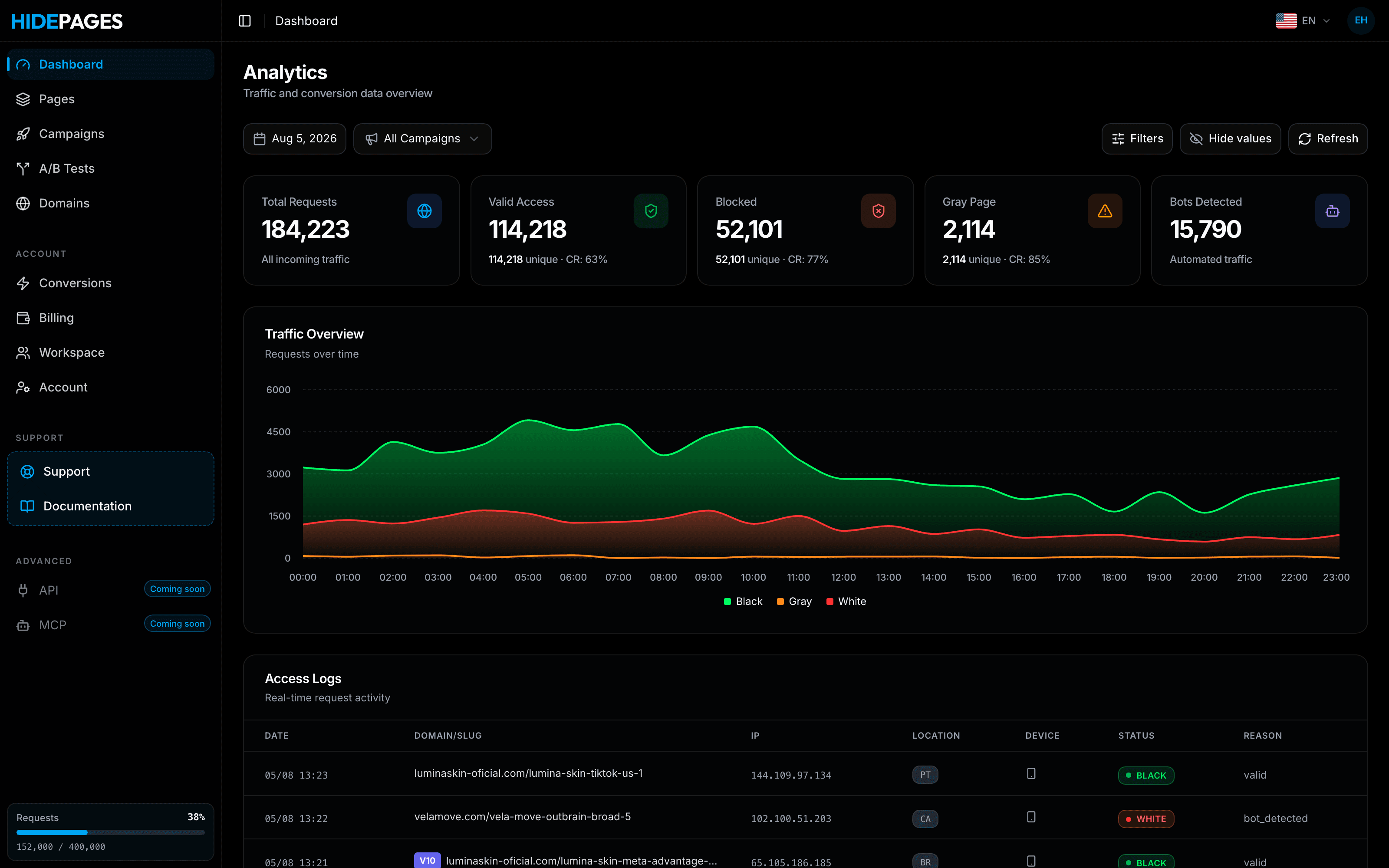
HidePages is a page builder with a native traffic filter (Zero-Redirect) for 15+ traffic sources. The filter and the pages run on the same hosted technology, which is the part that is actually different:
- The page is built and hosted where the filter runs. Use the blank editor, import code, clone a site you own by URL or start from a template. No HTML export, no folder paths, no PHP file.
- The campaign URL serves the decided page in the same response. Offer page or white page, there is no second hop.
- Each page can have its own filter: bots, spy tools, suspicious connections, geo, language, device and campaign parameters.
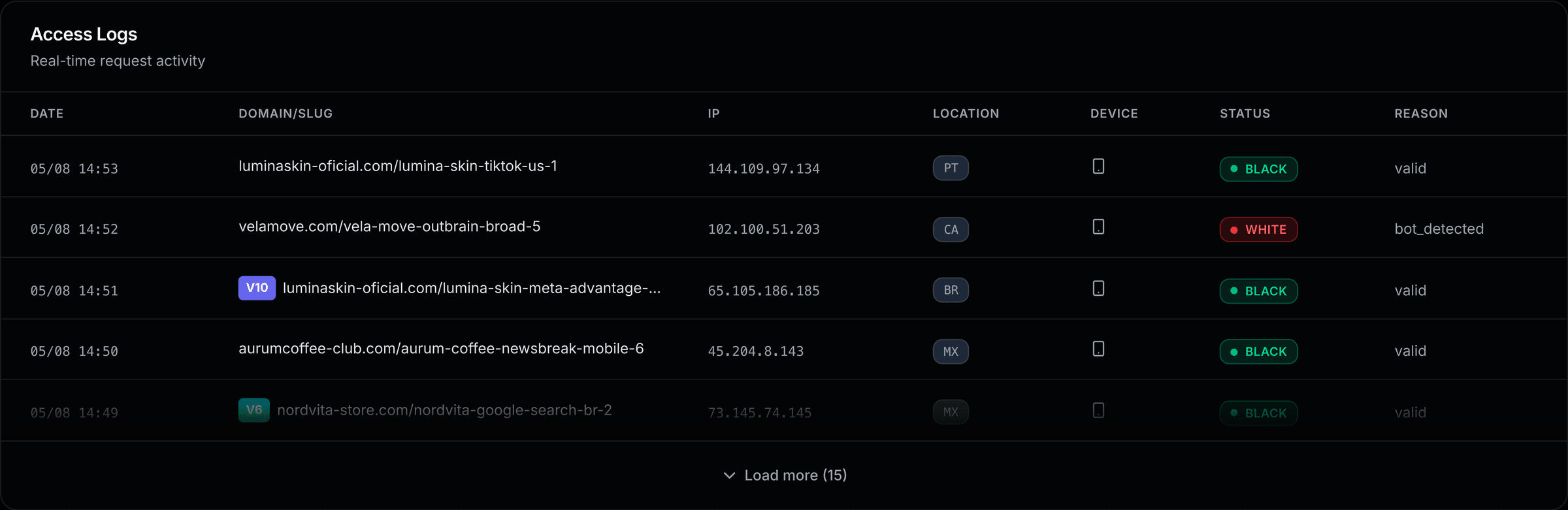
- Every request is logged with its status and the reason for the decision.
- Mirror mode serves an external page without a redirect; Redirect mode is there when you want one.
- Subpages, A/B tests and upsell funnels live in the same account, so a presell does not need its own host.
If you already run Adspect, Just Cloak It or Keitaro in no-redirect mode, the difference isn't the redirect. It's the server you no longer maintain and the builder you no longer pay for. The comparisons go deeper: HidePages vs Adspect, HidePages vs Just Cloak It and HidePages vs Keitaro. Why a builder in the same tool matters is covered in cloaker with a landing page builder.
Choosing: a quick decision guide
- You already run a VPS and like control: a script-based no-redirect setup (Adspect, JCI, Keitaro CURL) works. Budget for server time.
- You want nothing to install and your pages in one place: look at hosted options. Compare HidePages and Cloakilio on the builder, sources, domains and logs.
- You only send traffic to affiliate network links: no-redirect matters less after the first page. Focus on the filter and the presell.
- New to the category: start with what a cloaker is and the best cloakers of 2026, then check cloaker pricing in 2026.
FAQ
It is a traffic filter that answers the campaign URL with the selected page in the same HTTP response, instead of sending the browser to a second address with a 302, a meta refresh or a JavaScript redirect. The visitor's URL doesn't change and there is no extra hop before the content.
No. Adspect (Local File), Just Cloak It (file includes), Keitaro (CURL), FraudFilter, cloaker.net, Cloaking.House, CLOAK IT, MagicChecker, The White Rabbit (Mirror) and Cloakilio (Cloud Pages) all document a no-redirect option. HidePages combines it with hosted pages and a native builder, with no server or script to install.
Usually, yes. A 302 forces a second request, and a new domain can add DNS, TCP and TLS time. Serving in place removes that round trip. The page's own weight and the server's distance from your audience still matter.
It removes the most common way they get lost: a hop that doesn't forward the query string. When the campaign URL is the page, the parameters stay in the address bar. You still need correct pixel and Conversions API setup on the page.
With script-based tools (Adspect, Just Cloak It, MagicChecker, Keitaro), yes: PHP hosting or a VPS. With hosted tools such as HidePages or Cloakilio's Cloud Pages, the vendor serves the page at your campaign domain.
No. No tool can guarantee that. Ad platforms prohibit showing reviewers content different from what users see. No-redirect serving improves speed and measurement and keeps spy tools off your funnel; it doesn't change the platforms' rules.
Builder + filter in one layer
Protect your offers before the next spy finds them.
Build your pages, set the filter rules and launch — with Zero-Redirect delivery and every request explained in real-time logs.
- Setup in minutes
- Zero-Redirect
- Free assisted migration