
On this page
- HidePages vs Cloakerly at a glance
- The core difference: a filter you install vs a layer that serves the page
- Filtering
- Pages and hosting
- Pricing: per campaign vs per request
- Who should pick Cloakerly
- Who should pick HidePages: the Cloakerly alternative with pages included
- How to switch from Cloakerly to HidePages
- Bottom line
- FAQ
Cloakerly (cloakerly.com) is a traffic filter priced per campaign: $149 to $999 a month for unlimited clicks, connected through a PHP, WordPress or JavaScript snippet on pages you host. HidePages is a page builder with the filter built in, priced per request from $47 a month. It hosts the pages and serves them with no redirect and nothing to install. Cloakerly wins for one big campaign; HidePages wins for many smaller ones.
HidePages vs Cloakerly at a glance
| Feature | HidePages | Cloakerly (cloakerly.com) |
|---|---|---|
| Product type | Page builder + traffic filter in one hosted layer | IP fraud prevention and traffic filtering ("The Way to Filter") |
| How it connects | ✅ Campaign link points to HidePages; nothing to install | ⚠️ Snippet on your page: PHP, PHP cURL, WordPress plugin, JavaScript, React, Angular, Python, reverse proxy; or a hosted cloaked link |
| Delivery to real visitors | ✅ Zero-Redirect: the decided page is served in the same response | ⚠️ Redirect to the affiliate URL by default; "PHP cURL (No Redirect)" shows the offer in a full-page iframe |
| Page builder | ✅ Blank editor, import by code, clone any site by URL, templates | ❌ None mentioned |
| Page hosting | ✅ Included | ❌ Your pages live on your hosting |
| Filtering | Bots, spy tools, suspicious connections, geo, language, device, campaign parameters | IP reputation, device fingerprinting, proxies, VPN, datacenter, Tor, bots, geo down to city, device, OS, browser, UTM and click ID rules |
| Page rotation | ✅ A/B tests, subpages (presell, back redirect), upsell funnel | ✅ Rotate several affiliate pages by traffic %, separate Mobile, Tablet and Mac URLs |
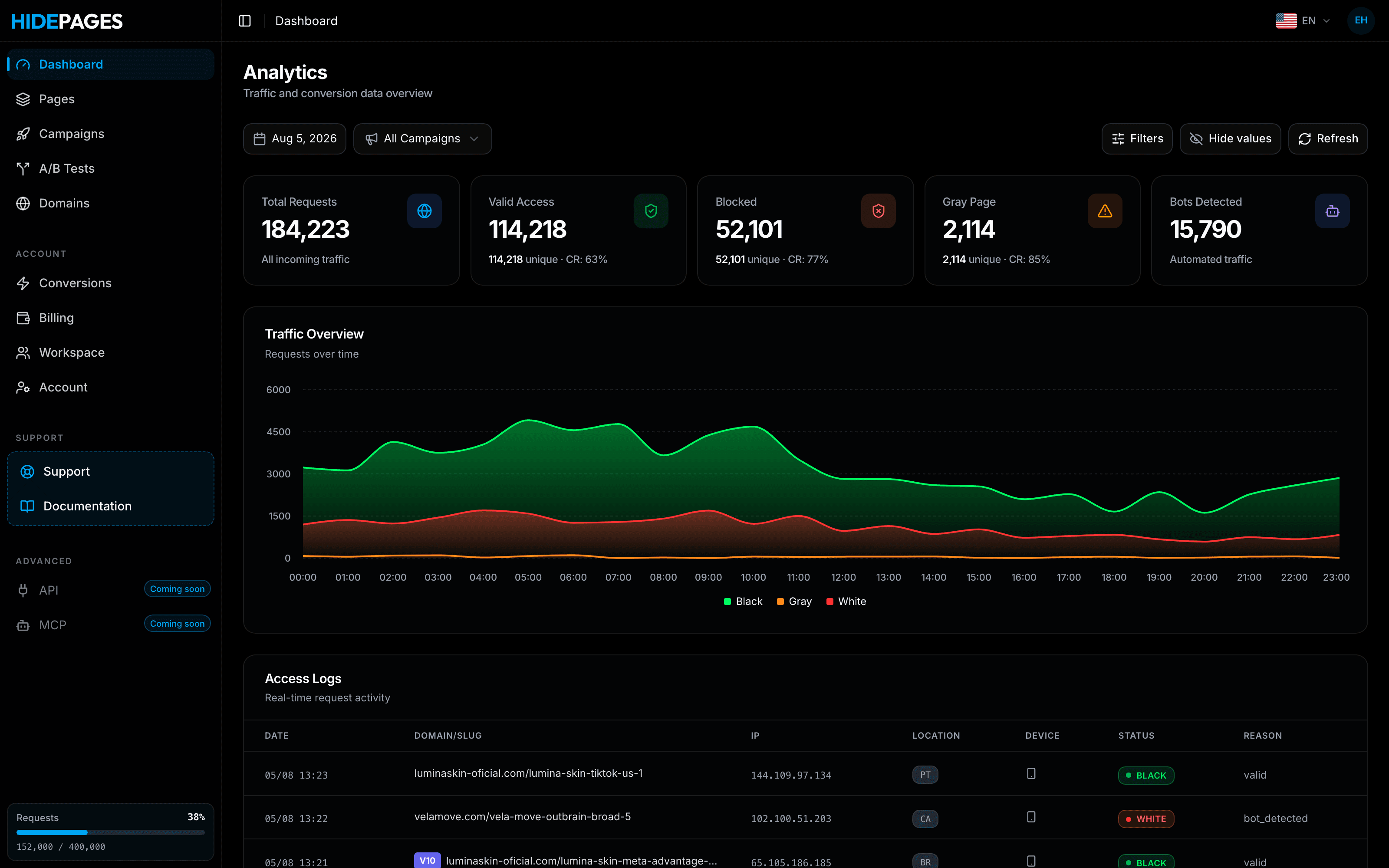
| Logs | Access Logs: every request, black/white status and the reason (e.g. bot_detected) | Real-time click monitoring (detail per entry not documented publicly) |
| Traffic sources | 15+: Google Ads, YouTube, Meta, TikTok, Taboola, Outbrain, NewsBreak, MediaGo, MGID, RevContent, TrafficJunky, Bigo… | Google Ads, Meta, TikTok, native networks, push and direct buys |
| Pricing model | Monthly request quota, no contract | Per campaign with unlimited clicks, or click packs |
| Price range | $47 → $697/month | $149 → $999/month; click packs from $179 |
| Support | WhatsApp; VIP with the founding team on Scale/Enterprise; free assisted migration | Live chat, email and Telegram |
Prices and features checked November 2026 on the official sites ([cloakerly.com](https://cloakerly.com/), [Cloakerly docs](https://cloakerly.com/docs/index.html), [hidepages.com](https://www.hidepages.com)). They may change.
The core difference: a filter you install vs a layer that serves the page
Both products make the same decision on each visit: real prospect, or bot, spy tool, proxy, VPN or datacenter connection? The difference is what happens around that decision.
Cloakerly: a snippet on your page
Cloakerly's docs list a lot of ways in, which is a real strength if you have developers:
- PHP (the default): paste the snippet "at the very top of the landing file". It needs PHP with the cURL extension. When Cloakerly returns an affiliate URL, the visitor is redirected; filtered traffic stays on the page.
- PHP cURL (No Redirect): the browser URL doesn't change, and allowed visitors see the offer in a full-page iframe. "The destination must allow framing."
- WordPress plugin: WordPress 5.0+ and PHP 7.4+, with a server-side check and a redirect.
- JavaScript: client-side, with the docs warning about a possible brief flash of the safe page, in-app browsers that may delay the request and less reliable IP detection.
- React, Angular and Python helpers, a reverse proxy PHP file that keeps your domain and streams the origin page, and link cloaking: a Cloakerly-hosted URL with nothing to install, which redirects.
In every option except the hosted link, the safe page and the offer pages are yours to build and host. Cloakerly's site doesn't mention a page builder or page hosting.
HidePages: the link is the filter
HidePages is a page builder with a native traffic filter (Zero-Redirect) for 15+ traffic sources. The campaign link points to HidePages. The filter decides, and the page it chose is served in the same response, from pages built and hosted in the same account. No PHP version to check, no cURL extension, no iframe whose destination has to allow framing.
Filtering
Cloakerly describes "AI traffic analysis, IP reputation data, device fingerprinting, and network-level detection" and lists datacenter and hosting traffic, public and private proxies, VPNs, Tor exit nodes, bots and "suspicious or non-human behavior patterns". It supports IPv4 and IPv6, targets by country, region or city, and lets you set device, OS, browser, frequency, UTM and click ID rules per campaign. The FAQ says it detects "known monitoring tools" and competitor scanners. Its site claims "1M+ IP's Blocked/Day"; that's a vendor figure we haven't tested.
HidePages ships filtering as features you switch on per page: bot detection, spy-tool blocking, Block Suspicious Connections, and rules for geo, language, device and campaign parameters. Each page can have its own filter.
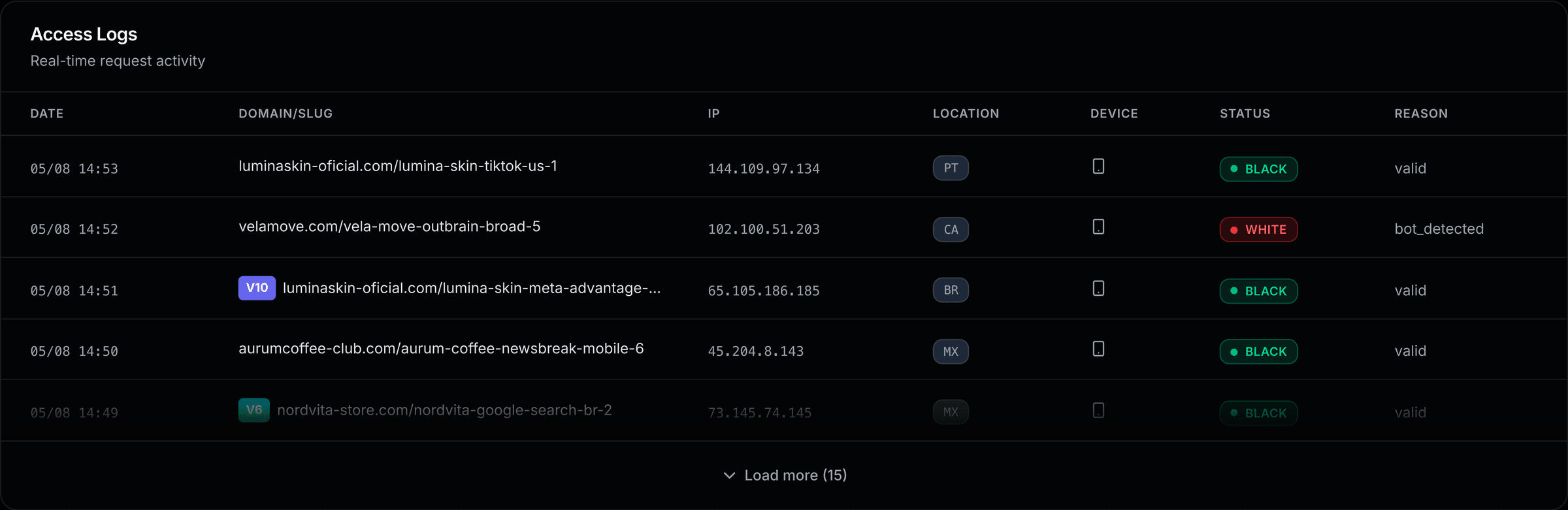
On filtering depth the two are close on paper; Cloakerly gives power users more knobs (city-level geo, frequency caps, separate Mac and tablet URLs). Where HidePages pulls ahead is visibility: every request is in the Access Logs with its status and the reason it got that page. When conversions drop on one source, you check the log instead of guessing.
Pages and hosting
This is where the products differ most. Cloakerly assumes your pages exist: you enter a Safe URL and "at least one affiliate page" in the campaign form, then integrate. If you need a new white page, presell or lander, you build and host it somewhere else.
HidePages builds them:
- Blank editor, import by code, clone any site by URL or templates.
- Mirror mode for external pages without a redirect, or Redirect mode when you want one.
- Subpages (presell, back redirect), A/B tests and an upsell funnel in the same campaign.
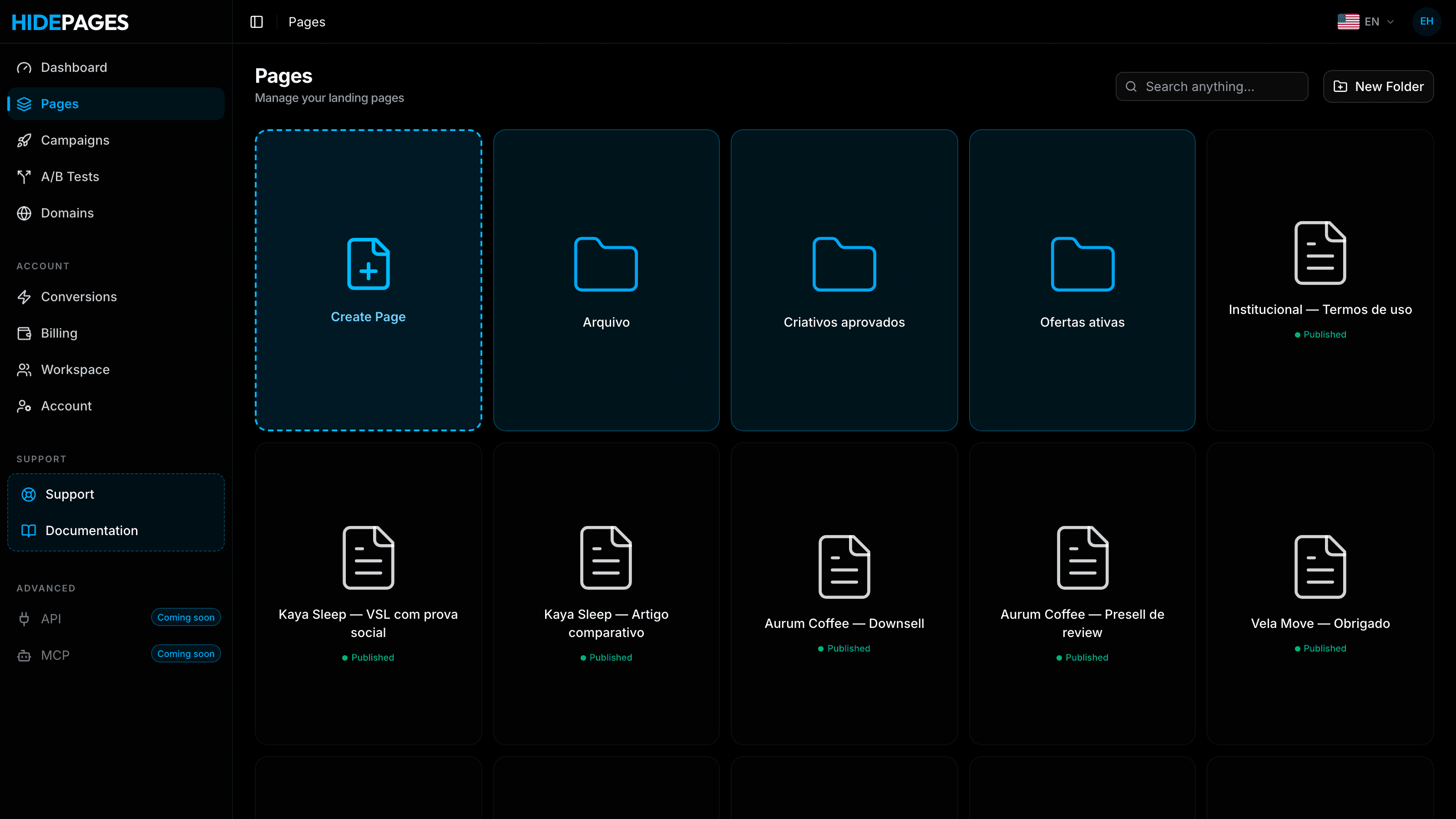
If you test many angles a week, that's the difference between duplicating a page in the panel and uploading new files to a server.
Pricing: per campaign vs per request
Cloakerly (cloakerly.com)
The pricing section has two tabs. Read on the page in November 2026:
| Subscription plan | Price | Campaigns | Clicks |
|---|---|---|---|
| Basic | $149/month | 1 | Unlimited |
| Intermediate | $299/month | 5 | Unlimited |
| Advanced | $599/month | 10 | Unlimited |
| Enterprise | $999/month | Unlimited | Unlimited |
| Pay-as-you-go pack | Price | Clicks | Campaigns |
|---|---|---|---|
| Basic | $179 | 10,000 | Unlimited |
| Intermediate | $299 | 30,000 | Unlimited |
| Advanced | $399 | 50,000 | Unlimited |
| Enterprise | $599 | 100,000 | Unlimited |
The page labels the click packs "/Yr", which reads as a validity period, but it isn't explained. Confirm with Cloakerly before buying. Its refund policy says it "does not issue refunds at the completion of any payment", with exceptions for upgrades and non-delivery. No trial is mentioned.
HidePages (monthly, no contract)
| Plan | Price | Requests/month | Extra request | Campaigns | Domains |
|---|---|---|---|---|---|
| Essential | $47 | 20,000 | $0.0025 | 10 | 10 (Meta and TikTok only) |
| Starter | $97 | 20,000 | $0.0025 | 30 | 30 |
| Growth | $197 | 100,000 | $0.0015 | 50 | 50 |
| Scale | $397 | 400,000 | $0.001 | 80 | 80 |
| Enterprise | $697 | 1,000,000 | $0.0007 | Unlimited | Unlimited |
Side by side
Assume one request per visit and Cloakerly's subscription plans:
| Scenario | HidePages | Cloakerly |
|---|---|---|
| 15,000 visits, 1 campaign, Meta | $47 (Essential) | $149 (Basic) |
| 60,000 visits, 5 campaigns | $197 (Growth) | $299 (Intermediate) |
| 350,000 visits, 10 campaigns | $397 (Scale) | $599 (Advanced) |
| 1,000,000 visits, 30 campaigns | $697 (Enterprise) | $999 (Enterprise) |
| 300,000 visits, 1 campaign | $397 (Scale) | $149 (Basic) |
| 3,000,000 visits, 40 campaigns | $2,097 (Enterprise + 2M extra) | $999 (Enterprise) |
The pattern is clear: Cloakerly's flat price wins when volume is concentrated in few campaigns; HidePages wins when traffic is spread across many. Using list prices and HidePages overage, the break-even points are roughly:
| Campaigns you run | Cloakerly plan | HidePages is cheaper up to about |
|---|---|---|
| 1 | Basic, $149 | 40,000 requests (60,000 if Meta/TikTok only, on Essential) |
| 2–5 | Intermediate, $299 | 168,000 requests (Growth + overage) |
| 6–10 | Advanced, $599 | 600,000 requests (Scale + overage) |
| 11 or more | Enterprise, $999 | 1.43 million requests (Enterprise + overage) |
Above those volumes, Cloakerly is cheaper on sticker price. Keep in mind that HidePages' number includes the page hosting you pay for separately with Cloakerly. The full per-1,000 math is in HidePages pricing explained.
Who should pick Cloakerly
Cloakerly is the better choice when:
- You run one or a few big campaigns. $149 a month for unlimited clicks on one campaign is hard to beat.
- You push more than ~1.4 million requests a month across many campaigns and want a flat bill.
- You have developers and like options. PHP, WordPress, JavaScript, React, Angular, Python and reverse-proxy integrations cover almost any stack.
- You want fine-grained routing: city-level geo, frequency caps, separate Mobile, Tablet and Mac URLs, and traffic splits across affiliate pages.
- Your pages are already built and hosted and you only need a filter in front of them.
Who should pick HidePages: the Cloakerly alternative with pages included
HidePages is the better choice when:
- You run many campaigns at small and mid volume. Below the break-even points above (for example 600,000 requests across 10 campaigns), HidePages costs less than the matching Cloakerly plan.
- You don't want hosting or integration code. No PHP, no cURL, no plugin, no iframe.
- Real visitors should see the page with no redirect and no frame. Zero-Redirect serves the page directly.
- You build and test pages often. Clone by URL, import code, use templates, add presells, back redirects, A/B tests and upsells.
- You want to know why. Every request in the Access Logs with status and reason.
- You run native and video sources such as NewsBreak, MediaGo, Taboola, Outbrain, YouTube, TrafficJunky and Bigo.
- You want help moving. Free assisted migration and WhatsApp support; VIP with the founding team on Scale and Enterprise.
How to switch from Cloakerly to HidePages
- 1Bring your pages. Your safe page and affiliate pages are on your hosting: clone them by URL, import the code or rebuild them in the editor.
- 2Point your domains to HidePages. Once the domain answers from HidePages, the Cloakerly snippet is out of the request path.
- 3Recreate each campaign as filter rules: geo, language, device and campaign parameters, plus bot, spy-tool and suspicious-connection filtering. Use A/B tests where you rotated affiliate pages.
- 4Swap the ad link one campaign at a time and compare the Access Logs with Cloakerly's stats.
- 5Cancel when you're convinced. Our team does this with you for free; the full guide is in how to migrate to HidePages.
Bottom line
Cloakerly (cloakerly.com) is a flexible filter with many integration options and a flat per-campaign price that pays off when your traffic is concentrated in a few big campaigns. You still build and host every page, and real visitors get a redirect or an iframe. HidePages hosts the pages, filters at the link with no redirect, logs the reason for every request and costs less when traffic is spread across many campaigns at small and mid volume. For one huge campaign, Cloakerly; for a portfolio of campaigns and pages, HidePages.
Start with what a cloaker is, see the best cloakers of 2026, check the cloaker pricing comparison, or compare HidePages vs TrafficShield and HidePages vs Just Cloak It, another snippet-on-your-site filter.
FAQ
No. Cloakerly.com ("© 2019-26 Cloakerly", Telegram @CloakerlySupport) and Cloakerly.io ("© 2026 Cloakerly, Inc.", @Clockerlysupport, plans from $29/month) are different products. This comparison covers cloakerly.com.
As listed on cloakerly.com in November 2026: Basic $149/month (1 campaign), Intermediate $299 (5), Advanced $599 (10) and Enterprise $999 (unlimited), all with unlimited clicks. Pay-as-you-go packs run from $179 for 10,000 clicks to $599 for 100,000.
By default, yes: the PHP, WordPress, JavaScript and link integrations redirect allowed visitors to the affiliate URL. Its "PHP cURL (No Redirect)" mode shows the offer in a full-page iframe instead, and a reverse-proxy option keeps your domain. HidePages serves hosted pages directly, with no redirect or iframe.
Cloakerly's site and docs don't mention a page builder or page hosting. You provide a Safe URL and affiliate pages hosted elsewhere. HidePages includes a builder, code import, cloning by URL and hosting.
It depends on how your traffic is spread. A single campaign above about 40,000 requests a month, or more than about 1.43 million requests on the top plans, is cheaper on Cloakerly. Many campaigns at small and mid volume (for example up to 168,000 requests across 5 campaigns) are cheaper on HidePages, which also includes hosting.
Yes. Clone or import your pages, point the domains, recreate the rules and swap ad links one campaign at a time while Cloakerly keeps running. Migration is assisted and free.
Builder + filter in one layer
Protect your offers before the next spy finds them.
Build your pages, set the filter rules and launch — with Zero-Redirect delivery and every request explained in real-time logs.
- Setup in minutes
- Zero-Redirect
- Free assisted migration