The problem: you pay for every request, human or not
Every paid click costs money, whether a person or a script made it. On most traffic sources, part of what reaches your landing page isn't a potential customer at all:
- Bots and crawlers that click, load the page and leave. They burn budget and, worse, fire your pixel and analytics events, which teaches the ad platform's optimization to find more of the same.
- Spy tools that follow your ad link to capture the landing page, the offer and the funnel. A page that converts gets copied.
- Data-center and suspicious connections. Real shoppers browse from home broadband and mobile carriers. Requests from hosting and cloud ranges are mostly automation.
- Out-of-target visitors. The campaign targets mobile users in Brazil, but some requests arrive from desktop in another country, or in a language the page doesn't serve.
- Broken or tampered links. A click that arrives without the parameters your traffic source always appends didn't come through normal ad serving.
Most bot-blocking tools work as a script that runs after the page loads, or as a report you read the next day. By then the visit is already counted, the pixel has already fired and the page has already been seen. A traffic filter that makes its decision on the first request avoids all three.
How the HidePages traffic filter works
HidePages is a page builder with a native traffic filter (Zero-Redirect) for 15+ traffic sources. The filter and the pages run on the same technology, so the decision and the delivery happen in one step.
- 1A visitor clicks your ad and requests your campaign link.
- 2The page's filter evaluates the request against the rules you set for that page.
- 3The link answers directly with the page the rule chose: your offer page (black) or your safe page (white). There's no second hop.
- 4The decision is logged with its status and reason, so you can see why each visitor got what they got.
What gets filtered
| Signal | What it catches | Typical use |
|---|---|---|
| Bots | Automated visitors, crawlers, scripted clicks | Keep junk out of your pixel and your stats |
| Spy tools | Ad-intelligence crawlers following your ad link | Protect the offer page from being copied |
| Suspicious connections | Data-center, hosting and other non-residential traffic | Cut automation that pretends to be a user |
| Geolocation | Country of the request | Serve only the GEOs you pay for |
| Language | Browser language | Match the page to the reader |
| Device | Mobile, desktop, tablet | Send each device the page built for it |
| Campaign parameters | URL parameters on the click | Require the parameters your traffic source always sends |
Every page has its own filter. A strict rule set for a high-value offer page and a looser one for an evergreen article can live side by side in the same account.
Access Logs: the reason behind every decision
A "blocked" count doesn't tell you what to fix. The Access Logs list each request with domain, IP, country, device, status and the reason for the decision, such as bot_detected.
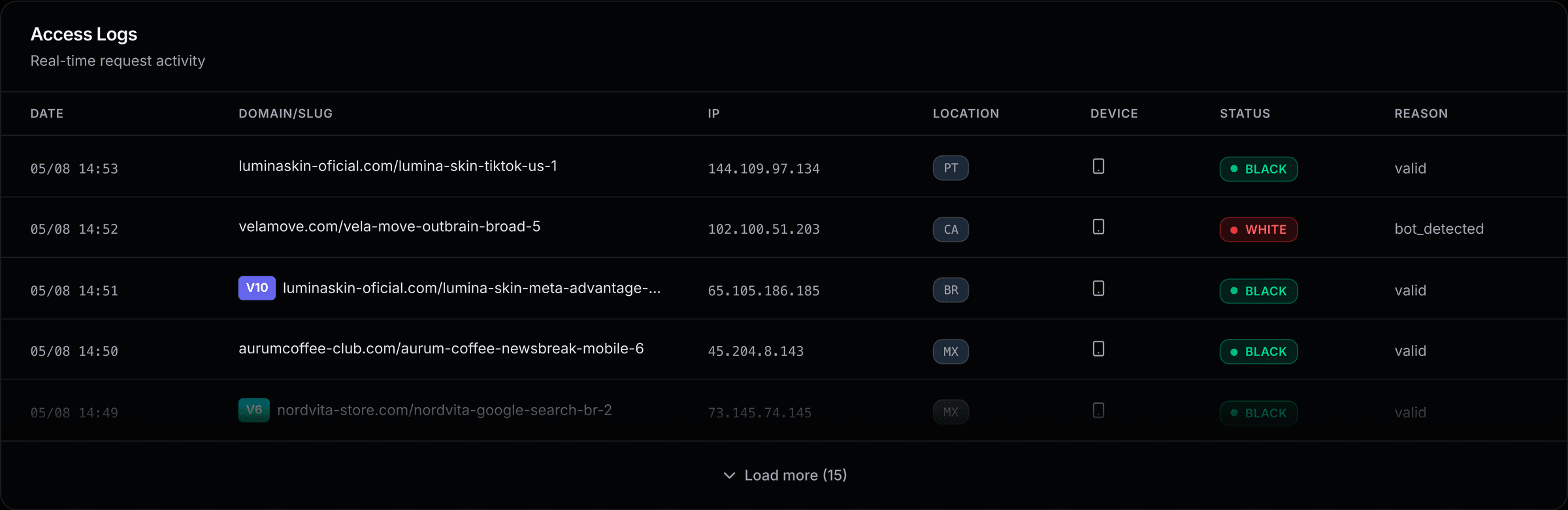
That record is what lets you act. If one campaign, source or placement sends mostly bot_detected, you know where to cut spend. If real customers are being filtered, you can see which rule did it and loosen it.
Zero-Redirect delivery
Many filters work by redirecting: the visitor hits the filter, then gets a 302 to the real page. That second hop is one more round trip on every click, and one more URL for a crawler or spy tool to record. With HidePages, the campaign link responds directly with the chosen page.
Zero-Redirect isn't exclusive to HidePages. Other tools offer a no-redirect mode, usually by running a script on your own server. The difference is the combination: no redirect, hosted pages, a native visual builder and per-request logs, in one account, with no server, no code and no integration to install.
Works with your traffic sources
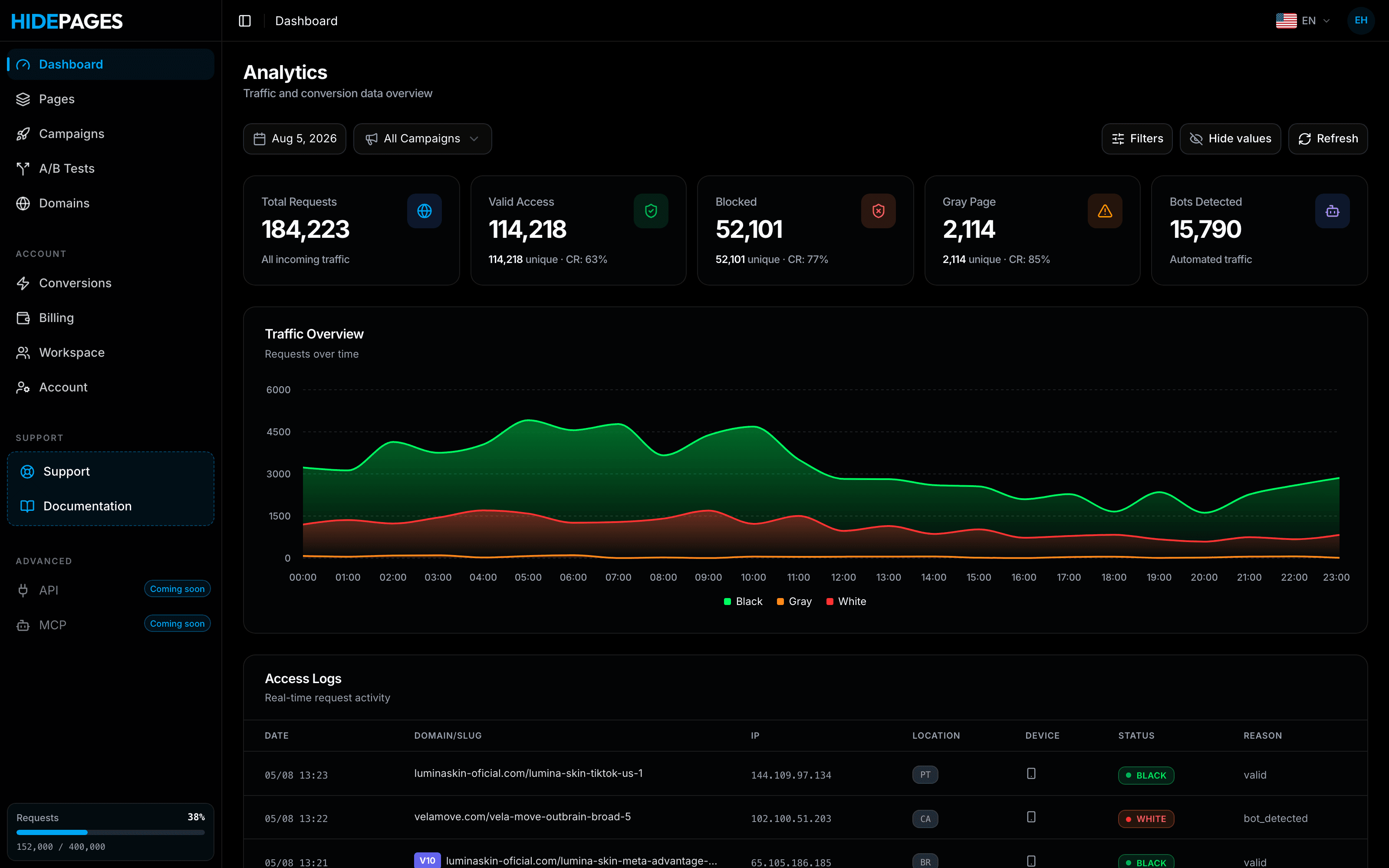
The filter runs on Google Ads, YouTube, Meta, TikTok, Taboola, Outbrain, NewsBreak, MediaGo, MGID, RevContent, TrafficJunky, Bigo and more, 15+ sources in total. You create a campaign per source, attach a page and its filter, and use the same logs everywhere.
What you can build on the filtered link
- Offer pages and landing pages, built in the native builder from a blank editor, a template, your own code, or by cloning an existing page from its URL.
- White pages: a safe, compliant page for traffic the filter doesn't send to the offer.
- Presells and subpages, A/B tests and upsell funnels.
- External pages served without a redirect through Mirror mode, or sent to an external URL with Redirect mode.
HidePages vs. a bot-blocking script + a separate page host
| Bot-blocking script + page host | HidePages | |
|---|---|---|
| When the decision happens | Often after the page loads | ✅ On the first request, before the page |
| Pixel and analytics | May fire before the bot is flagged | ✅ Filtered traffic gets the page you chose |
| Rules per page | Depends on the tool | ✅ Each page has its own filter |
| Reason per request | Often only totals | ✅ Status and reason in Access Logs |
| Page hosting and builder | Separate tool | ✅ Native builder, hosted pages |
| Delivery | Script or redirect | ✅ Zero-Redirect |
| Setup | Script or tag on every page | ✅ No server, no code, no integration |
Plans
Pricing is per request, with no contract. Essential ($47/month) covers Meta and TikTok with 20,000 requests. Starter ($97) opens all traffic sources with 20,000 requests and 30 domains. Growth ($197) includes 100,000 requests, Scale ($397) 400,000 and Enterprise ($697) 1 million, with VIP support on the two higher plans. See the details in the pricing section.
FAQ
A traffic filter checks each visitor to your ad link and decides which page they see, based on rules such as bot detection, connection type, geo, language, device and campaign parameters. The goal is to keep invalid and unwanted traffic away from your offer page, your pixel and your stats.
The technology overlaps: both decide per request which page to serve. "Cloaker" is the name media buyers use; "traffic filter" describes the job. HidePages uses it to filter bots, spy tools and out-of-target traffic. Showing reviewers different content than users see violates ad platform policies, and no tool can guarantee an account won't be blocked.
Yes. Every request appears in the Access Logs with its status (black or white) and the reason, for example bot_detected, plus IP, country and device.
Any filter can make mistakes, which is why the logs show the reason per request. If you see real buyers filtered, you can tell which rule caused it and adjust that page's filter without touching the others.
No. Pages are built and hosted in HidePages, so there's no script, plugin or server to set up. You point a domain, build or import the page, and attach the filter.
Not necessarily. HidePages filters traffic and hosts the pages; a full tracker handles deep attribution and postback reporting. Many buyers keep both. If you're coming from another tool, migration is assisted and free; talk to the team on Telegram @hidepages.
Keep reading
Builder + filter in one layer
Protect your offers before the next spy finds them.
Build your pages, set the filter rules and launch — with Zero-Redirect delivery and every request explained in real-time logs.
- Setup in minutes
- Zero-Redirect
- Free assisted migration